RedLine Infostealer — Malware Analysis & Threat Intelligence
Executive Summary
A result of analyze a 32-bit Windows executable that functions as a multi-stage loader for a .NET credential and cryptocurrency-wallet stealer. The sample uses process hollowing against AppLaunch.exe, a legitimate signed Microsoft .NET utility, to execute its payload under the identity of a trusted binary.
The loader is built with MinGW/GCC and employs a packed outer stub with eleven PE sections and three TLS callbacks that execute before the entry point. The final payload is a ~107 KB .NET 4.0 assembly whose capabilities center on harvesting browser credentials and cookies, cryptocurrency wallet data across at least seven browser-extension wallets, and Telegram session material.
Based on our Threat Intelligence result we attributed the malware to RedLine Infostealer based on the many indicators. The tooling — an AppLaunch-hollowing crypter fronting a commodity .NET stealer — is consistent with widely-distributed crimeware sold or shared among multiple operators, and the loader and payload should be tracked as separable components.
The second stage which is the infostealler extracted during malware analysis was not found as submitted sample in VT (until this moment), but after analyze it using private submission we can see clearly that it’s associated with many RedLine info stealer.
For defenders, the highest-confidence detection opportunity is behavioral rather than static: the creation of AppLaunch.exe in a suspended state by a non-.NET parent process, followed by remote memory writes and thread resumption, is a reliable and durable signature that survives repacking of the outer stub.
Key Findings
1.1 Sample Overview
| Attribute | Loader (Stage 1) | Payload (Stage 2) |
|---|---|---|
| SHA-256 | 5b08fb68dd6eaa0fd5ad1dbe4811dc24facd42c51131e6d2ca946f39626900ea | 514767bb66d0595bf8d68747970e14622f92e60e1e8637af80508945f0171a90 |
| SHA-1 | 8ab345ce69b81ffa81bc1eba13892fbae8d4bc6c | 50b63a6a01a0328549e0c98276c1ce252056421d |
| MD5 | 692d0ae039b3f97f30761a722d3138e0 | edb50a13766a91ce11b63ec449f5f90d |
| Type | PE32 executable | PE32 .NET assembly (IL-only) |
| Size | ~6.9 MB virtual | 109,568 bytes (reconstructed) |
| Compiler | MinGW/GCC | .NET Framework v4.0.30319 |
| Sections | 11 | 3 (.text, .rsrc, .reloc) |
| Image base | 0x400000 | 0x400000 |
| Entry point | 0xa15da9 | 0x1adca (managed token 0x6000047) |
Technical Analysis
In this section we will dive into the malware sample more technically, in this analysis we will use multiple ways to analyze the malware behavior:
Tool kit:
- PeBear
- Floss
- FakeNet
- x32DBG
- dnSpy
- Hollowing Hunter
Threat Intelligence Platforms:
- Virustotal (GTI Enterprise Version)
- Censys
- Recorded Future
Stage 1 - Loader
| Attribute | Loader (Stage 1) |
|---|---|
| SHA-256 | 5b08fb68dd6eaa0fd5ad1dbe4811dc24facd42c51131e6d2ca946f39626900ea |
| SHA-1 | 8ab345ce69b81ffa81bc1eba13892fbae8d4bc6c |
| MD5 | 692d0ae039b3f97f30761a722d3138e0 |
| Type | PE32 executable |
| Size | ~6.9 MB virtual |
| Compiler | MinGW/GCC |
| Sections | 11 |
| Image base | 0x400000 |
| Entry point | 0xa15da9 |
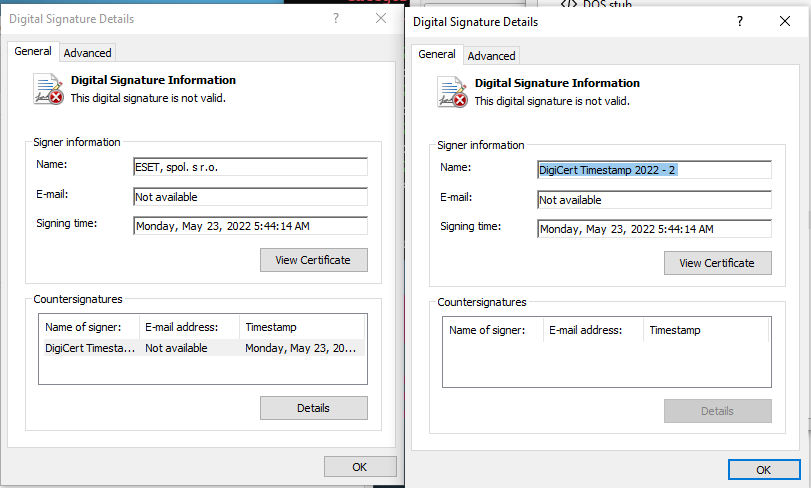
The file have a invalid digital signature, it’s singed primary by “ESET, spol. s r. o.” on Monday, May 23, 2022 and nested details of its countersignature (timestamp) “DigiCert Timestamp 2022 -2” as shown in the digital signature details
Static Analysis
We will start our analysis with String or floss (which I prefer) to see the content of this sample from outside then we will dig deep later on and try to understand what this sample hide:
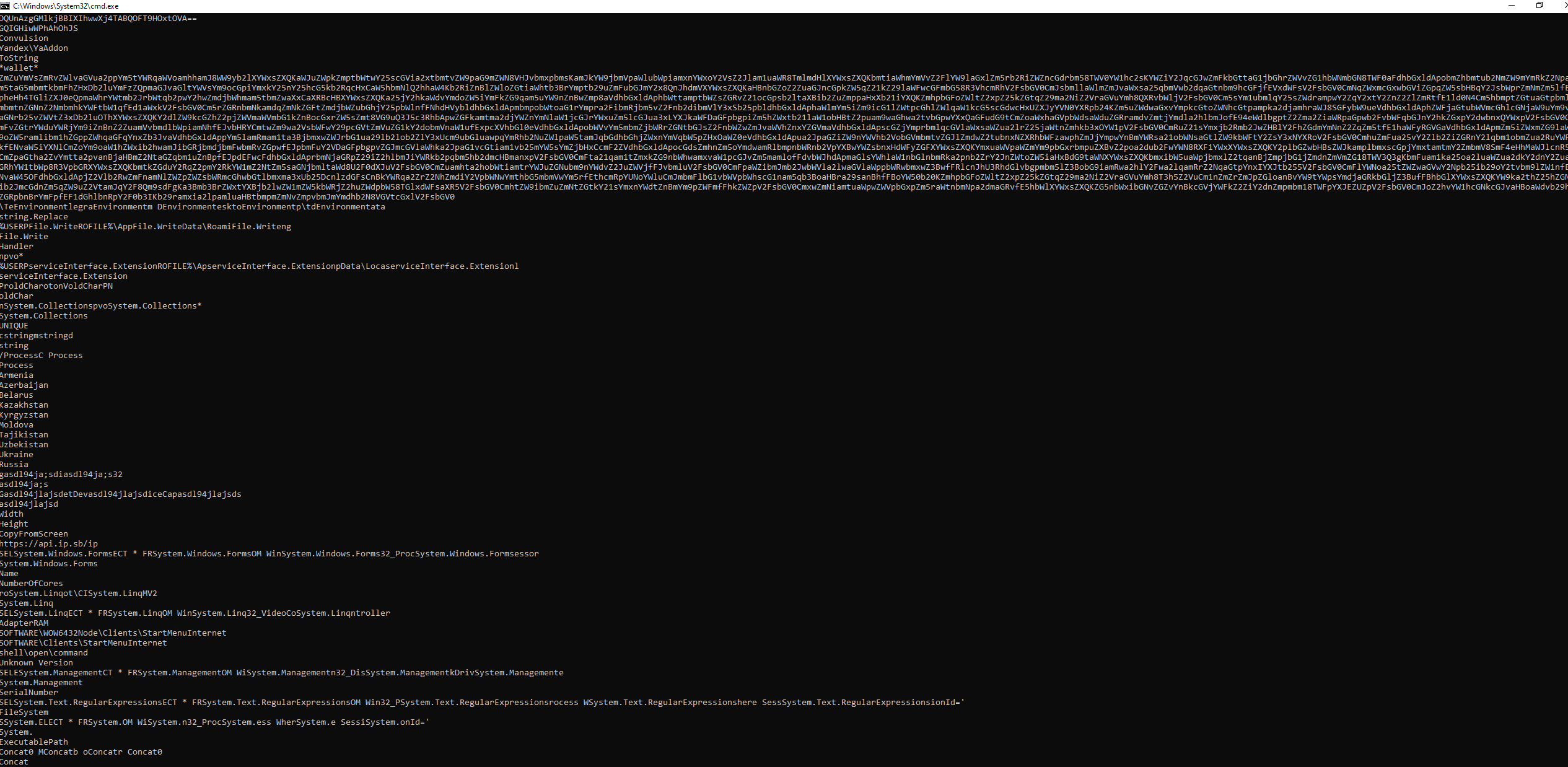
From here we can see some catchy long base64 encoded strings and if we try to decode it we will see:
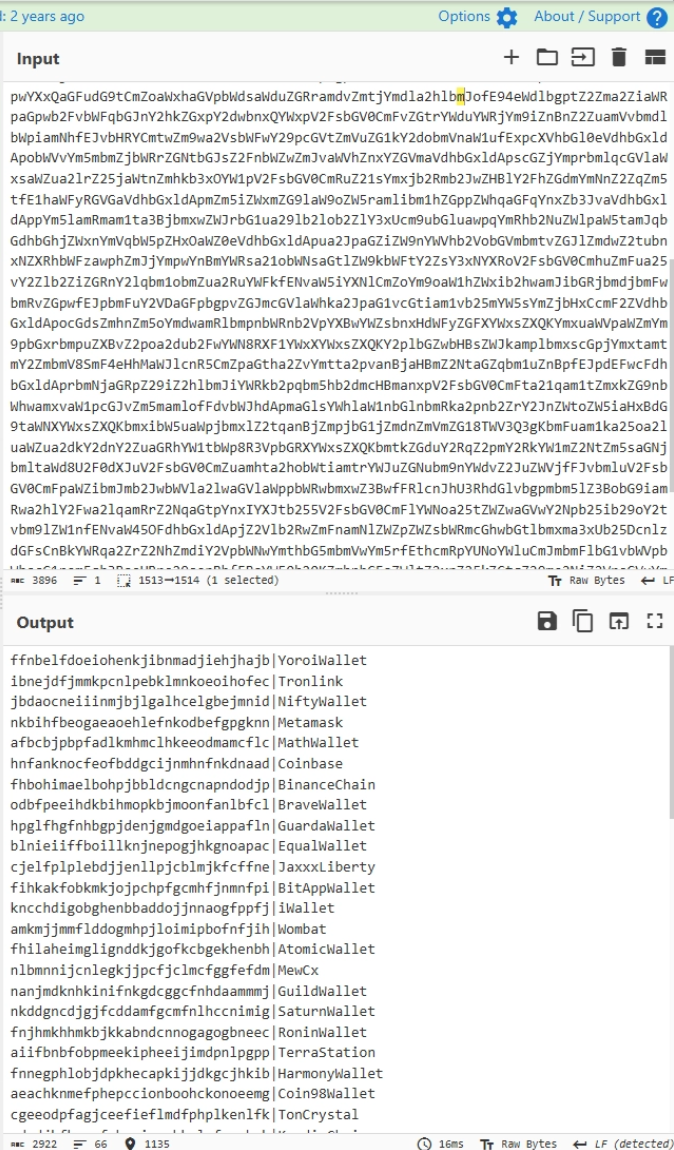
these are crypto wallets addresses in different crypto vendors such as (YoroiWallet, Tronlink, iWallet, etc.).
Also we can see readable strings wallet, Yandex, net.tcp://, base64 encoded string that i couldn’t decoded now (later we will see how to decode it):
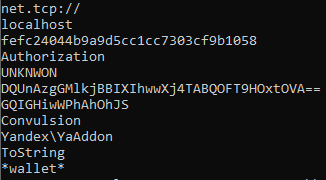

And also an API subdomain for IP check website, which usually will used to check wither the local or remote IP if it’s working or not.
[File Information]
First thing we will notice about this malware sample are the unstandardized sections (in total 11):
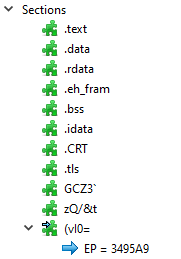
And the entry point start from the customize section “(vl0=” where the malware packed as shown in DieNet this section had a high entropy:
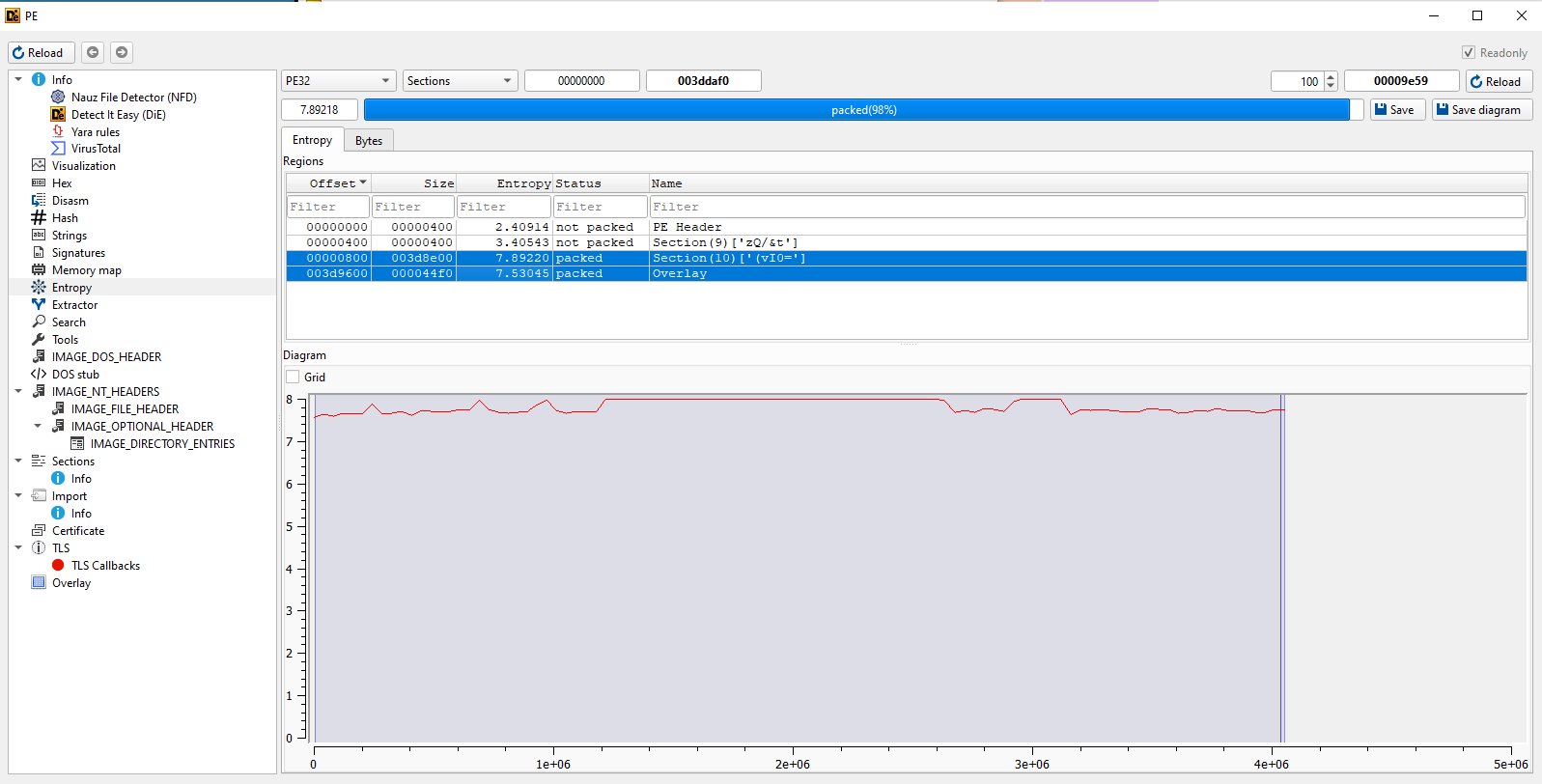
which indicator of packing.
If moved to the Imports table we can see unclear unpacking patterns & injection too
in we will see more about this suspicious patterns in the dynamic part.
Let get into dynamic analysis.
Dynamic Analysis
In the dynamic analysis we will start with the break points, and the most interesting thing about that is the shown libraries & imports, which will find a clear pattern for unpacking/loading and injection hollowing.
Unpacking / loader chokepoints
1
2
3
4
5
6
VirtualProtect
GetProcAddress
LoadLibraryA
NtWriteVirtualMemory
VirtualAlloc
VirtualAllocEx
Injection / hollowing
1
2
3
4
CreateProcessInternalW
NtResumeThread
NtMapViewOfSection
WriteProcessMemory
so we will set a break points on all the mentioned imports pattern, that will help us through our analysis.
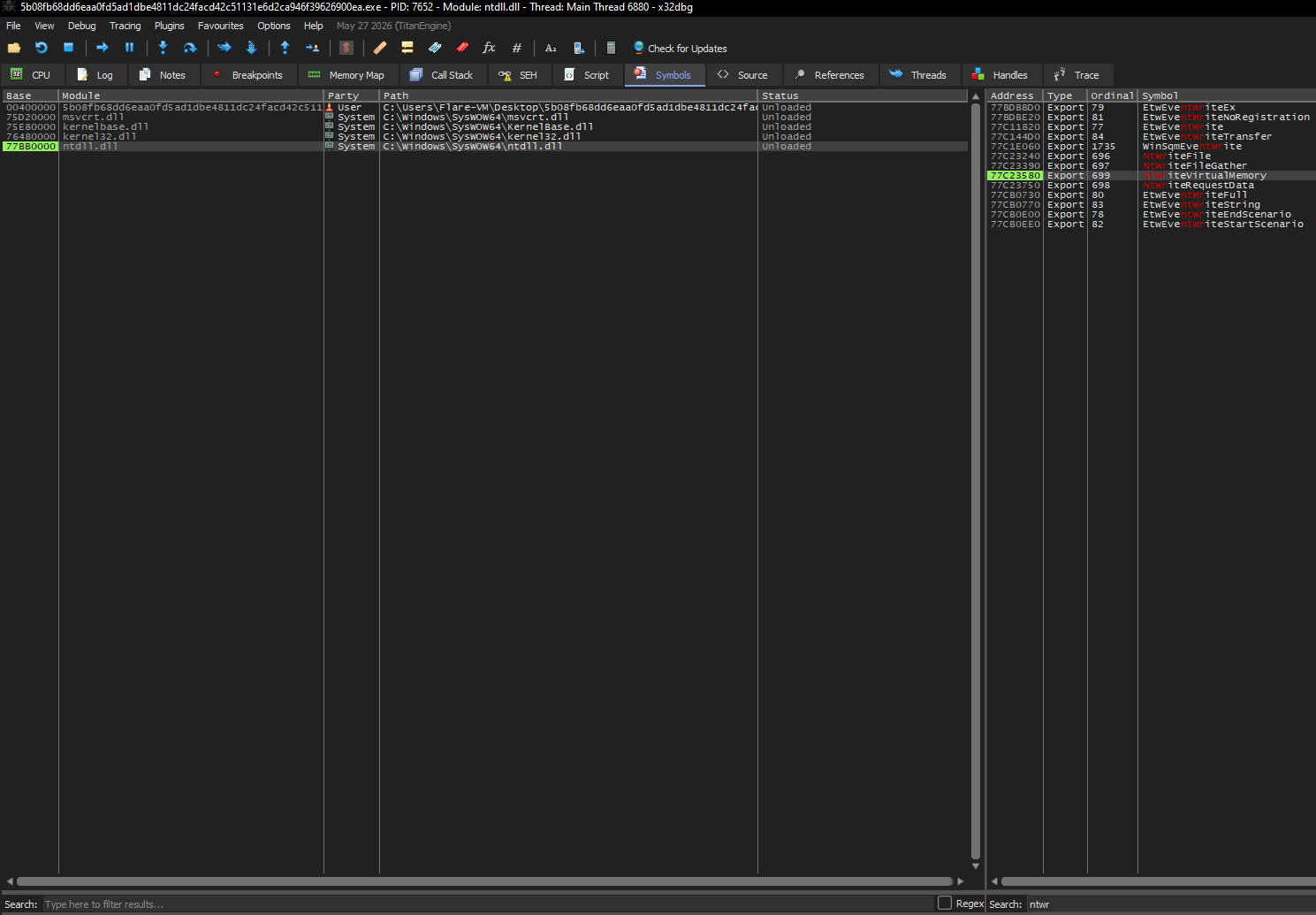
since we think of process hollowing let’s also open the process explorer to detect any spawning for a new process.
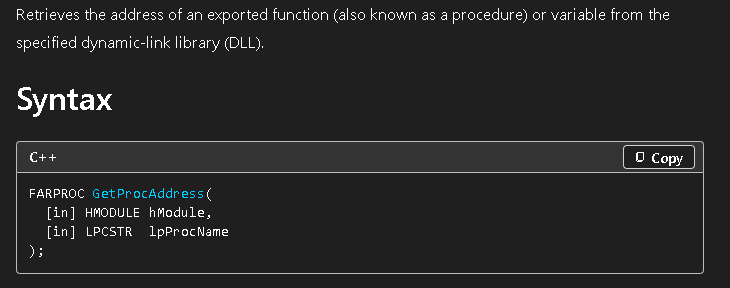
After many running we will know where the unpacking activity happened easily since in this sample the unpacking process takes a lot of time, after that we can see the first interesting step that malware will stop at in our analysis which is “GetProcAddress” and this api actually takes two arguments a handle to module and process name (Handle of Module, Get Procedure Address):
So let’s check the arguments panel in debugger:
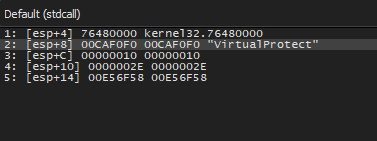
Which resolving the address of VirtualProtect out of kerenel32. The more interesting is the stack panel which shows the process name clearly:
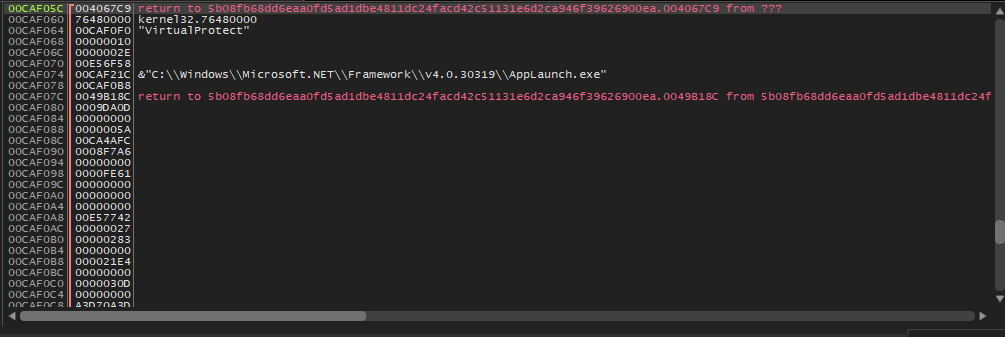
This show us clearly the target process path that the malware which to inject their malicious code into.
let’s understand how VirtualProtect works based on the official Microsoft API documentation.
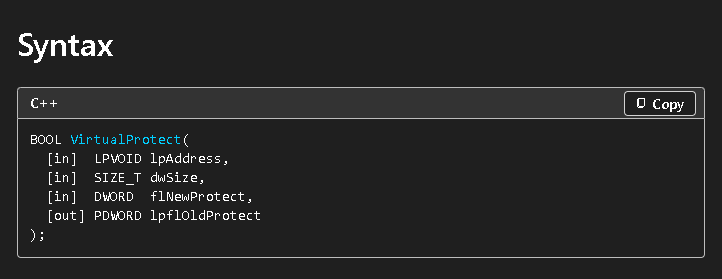
Decoding the VirtualProtect(lpAddress, dwSize, flNewProtect, lpflOldProtect) args:
[esp]→ return address (in the sample’s image — the payload/packer code calling it)[esp+4]→ lpAddress (region being reprotected — the hollowing-code area)[esp+8]→ dwSize (In our case: 1918 bytes)[esp+0xC]→ flNewProtect = PAGE_EXECUTE_READWRITE
This help us to understand that the target process which we can see in the stack is “AppLaunch.exe”. Moving forward to our next breakpoint, we will see it will stop at NtWriteVirtualMemory :
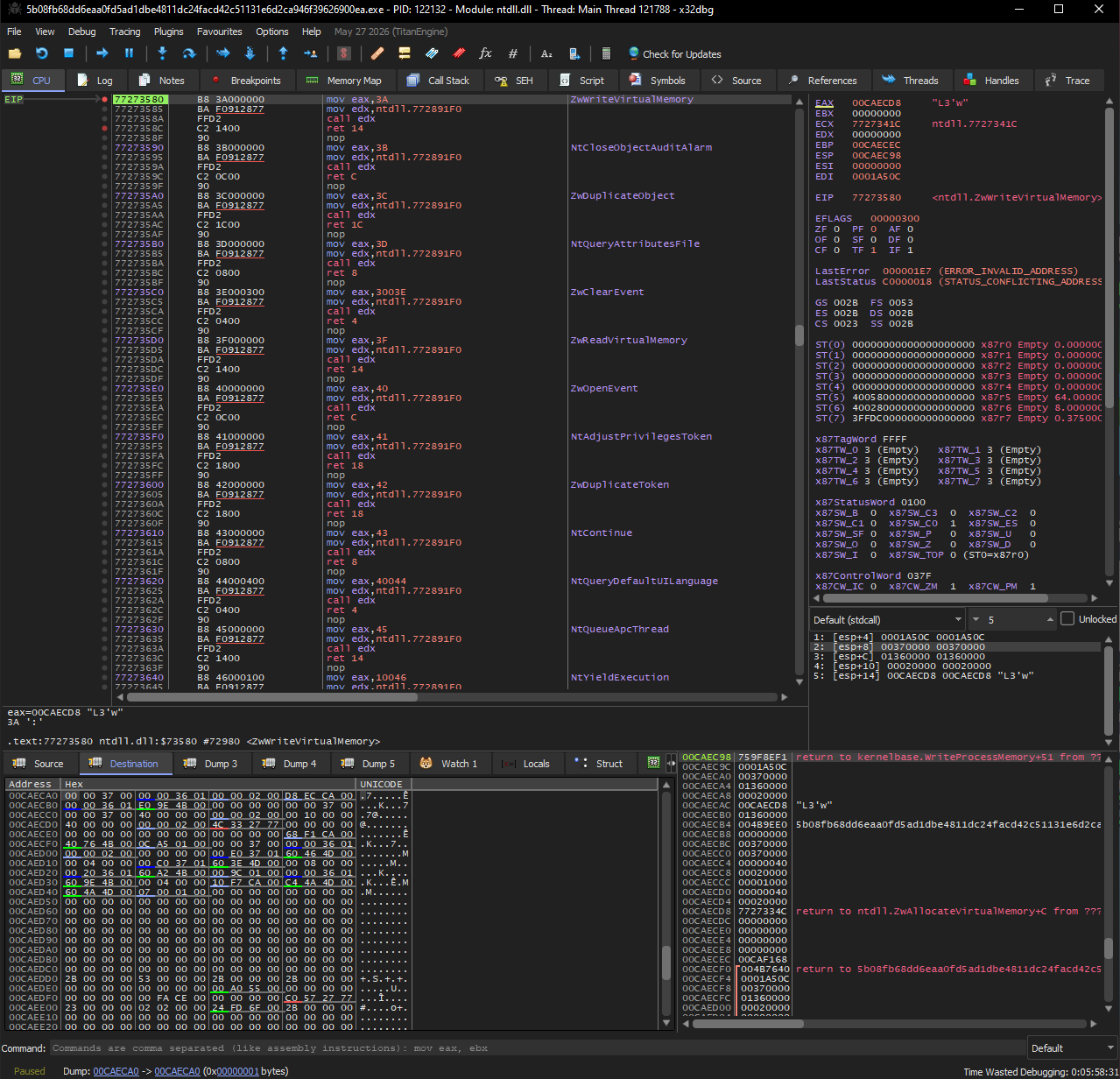
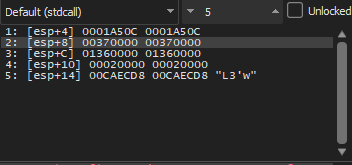
at the end of “NtWriteVirtualMemory” we can check the process hacker and we will find that “AppLanucher.exe” is already exist and be herisented from our malware:

Decoding NtWriteVirtualMemory(ProcessHandle, BaseAddress, Buffer, NumberOfBytesToWrite, *Written):
[esp]→ return address[esp+4]=0x001A50C→ ProcessHandle, this writes into another process (the child)[esp+8]=0x00370000→ BaseAddress (destination in the child)[esp+0xC]=0x01360000→ Buffer (source, in the parent — this is what we read)[esp+0x10]=0x00020000→ Size of bytes to write (this is the area that the malware allocate to write into in the target process)
We can see the handle and destination in the target process (later on this will help us to define the area that the malware live in the target process).
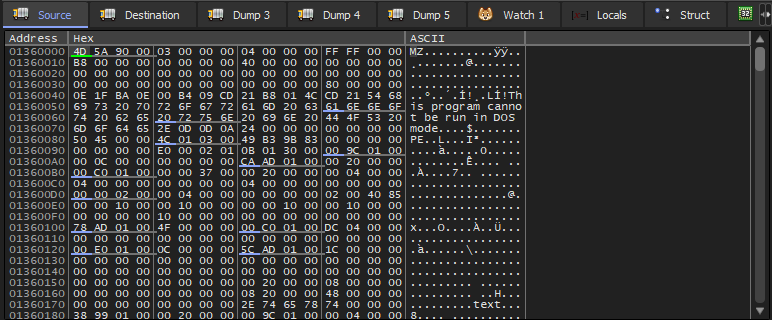
Also if we want to check the source and destination now to see the malware that will be injected we can check the address of
- “
[esp+0xC]” for the source - “
[esp+8]” for the destination
Source:
Destination:
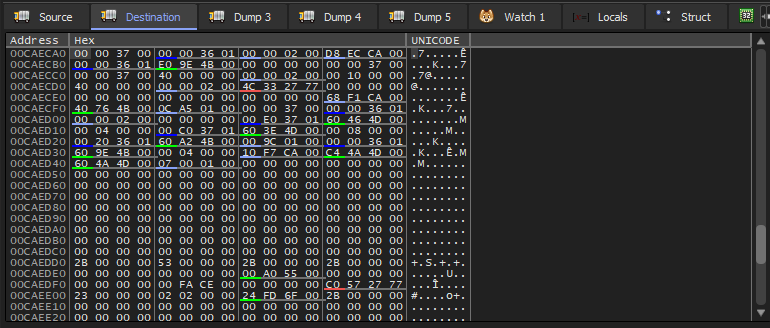
In the source we can see clearly the “MZ” which is the well known magic byte for the Portable Executable beside of the DOS message and we can know that this is a executable code.
NOTE: it’s not recommended to export the executable at this stage otherwise you will face an issue with padding since the virtual size is different from the real image size, in our case it’s 0x20000 as we saw in the previous function at [esp+0x10] , and the problem is the null byte is between different areas so this is not the real malware size.
we can also reach to the area in the debugger through “Memory Map”:
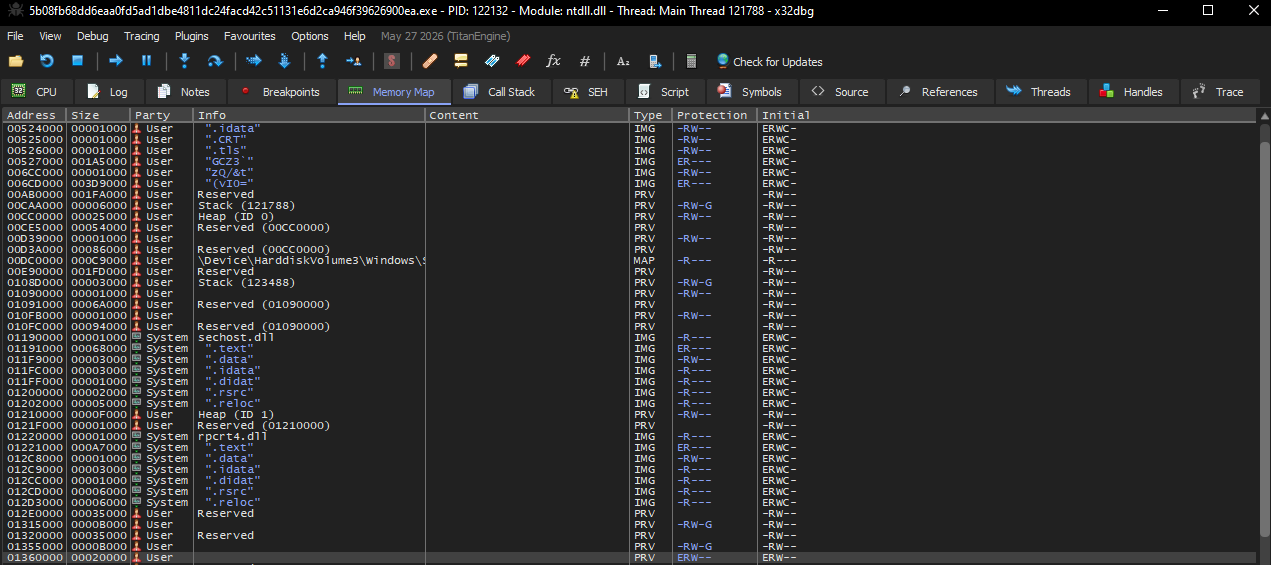
As we can see it’s located at “0x01360000” with size “0x00020000” with permission ERW (Execution, Read, Write).
Network Analysis
before we move on I stopped here to run “Fakenet” which is a tool emulate DNS server to detect any network traffic interaction, so before the malware executed we can see any network activity the malware do:
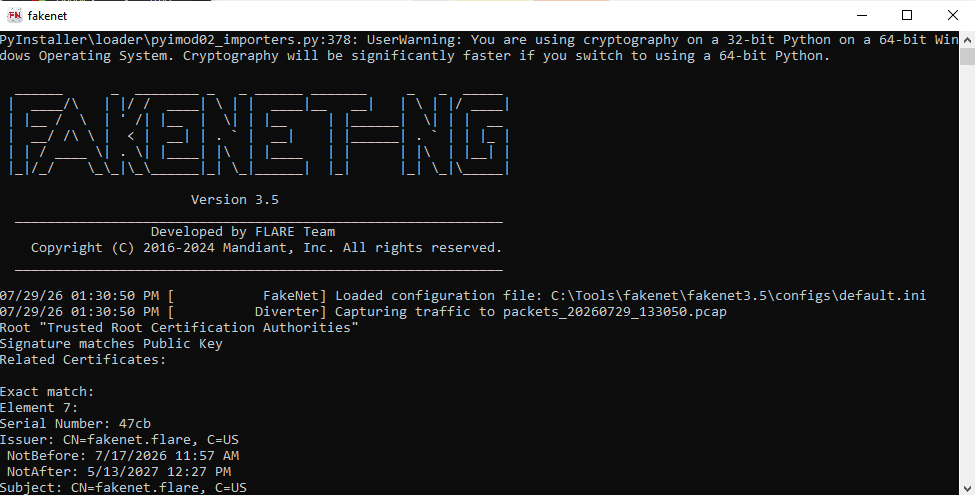
After we establish our “fake” DNS server we can move on in the debugger and see suspicious network connections from the malware sample toward the IP “62.204.41[.]163” on port “137”:

And if we have check the properties from process hacker (TCP/IP), we can see the local address for our VM, and remote address that the malware try to reach to:

Extract the malware core
In this step we will use “Hollowing Hunter” tool to detect and extract the malware sample from the target process “AppLanch.exe”:
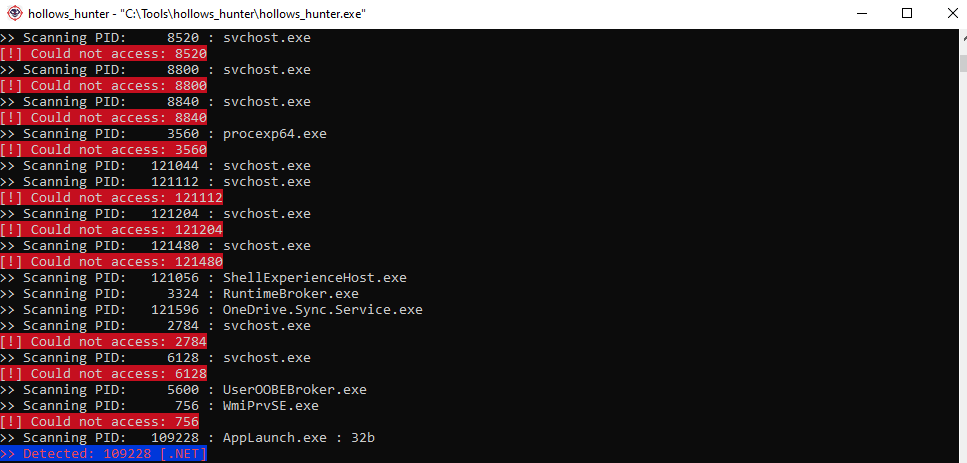
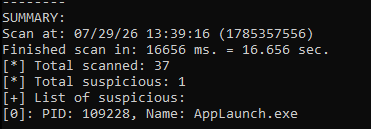

NOTE: I have tried to extract the sample in two ways: -
- During debugging “Dump_from_x32dbg.bin” and the size is 128KB.
- Using Hollowing Hunter “370000.AppLaunch.exe” and the size is 107KB.
Why this different when the samples are the exact same but extracted in different time?
The answer is mentioned in the previous note, but i want to add the key concept to understand this matter which is the virtual memory, we need to understand that there is a different between Virtual Size and Image Size, during the process execution in the memory it deal with the virtual addresses which is bigger, so if we try to extract the malware at this stage we need to deal with the “padding” and The padding isn’t only at the end. It’s between sections too. so we can’t just see how much is the virtual size and the image size and make a simple calculation with (A-B=C).
Can we dump the sample during debugging?
Yes of course, we can but we need to take in our consideration the points that we mentioned before, and do small anatomy process to extract the pure malware sample. (maybe we will do it later in another article)
However, if we check the sample with any static analysis tool we can see clearly it’s “.NET” file. So what is the best than dnspy to handle it, let’s open it and see what this sample try to hide:
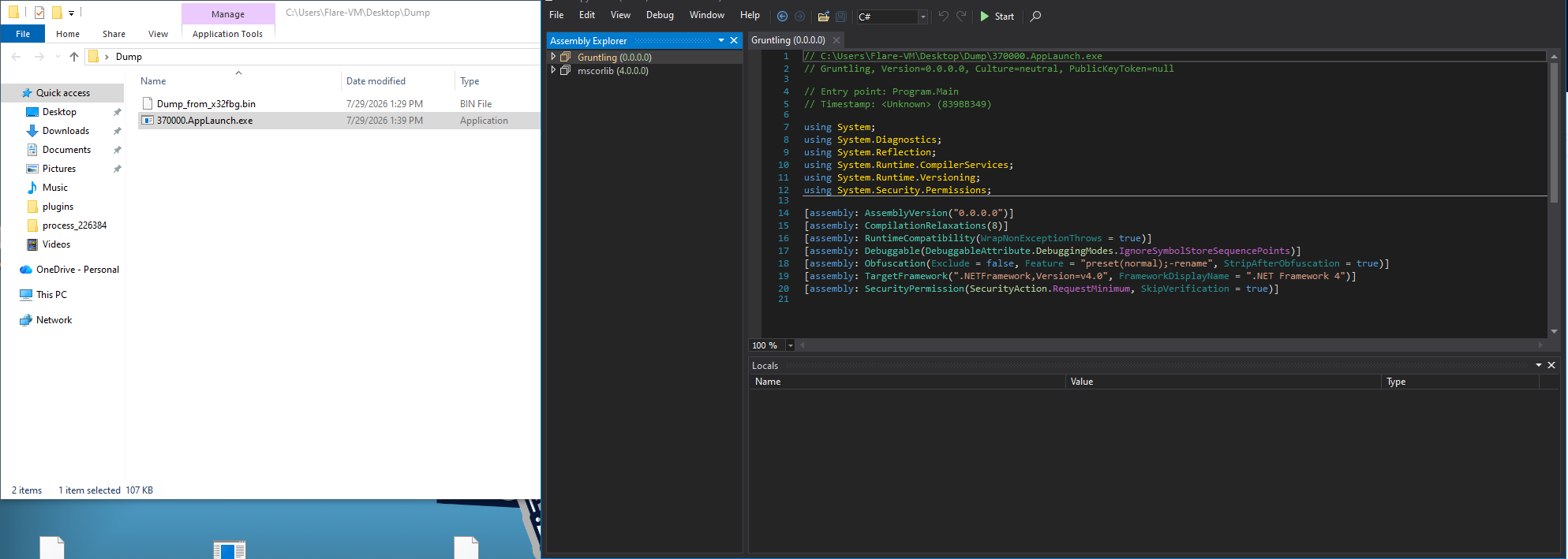
First thing we can notice that the name of the sample is “Gruntling” which is the given name by the malware author.
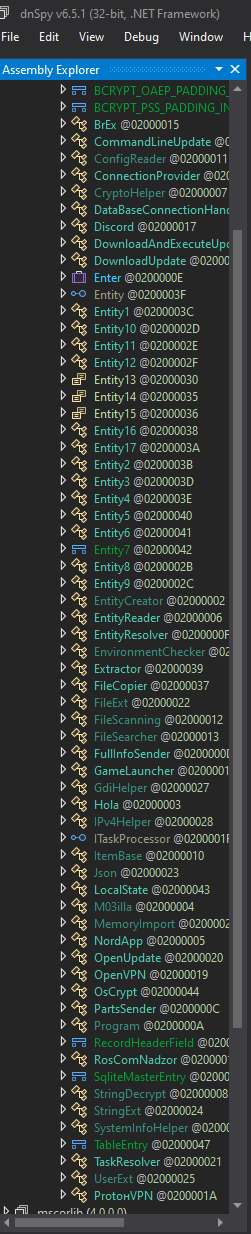
On the side we can see in a plain text the name of the functions and most of them contains some well known VPN’s executable names such as (ProtonVPN, OpenVPN, NordApp) also Discord.
After play around with these functions, one of them was very interesting one which is “Arguments” and it contains (IP, ID, Key) and blank message, and from the context we can see base64 encoded string we tried to decode before in first step:
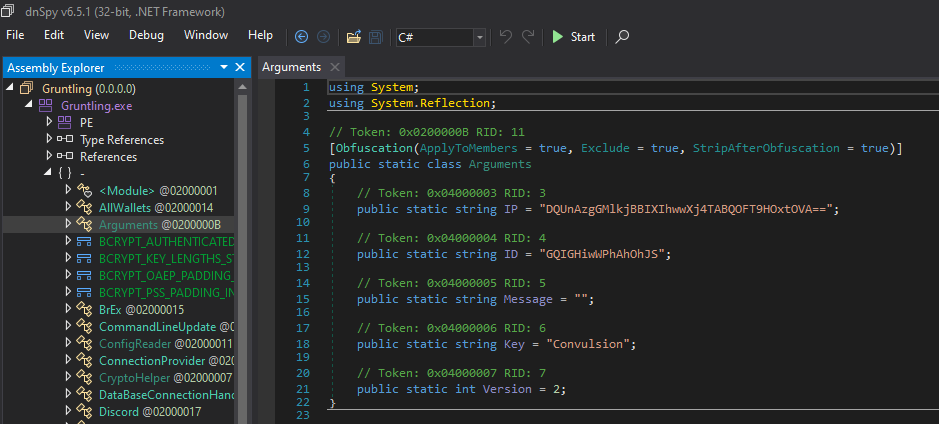
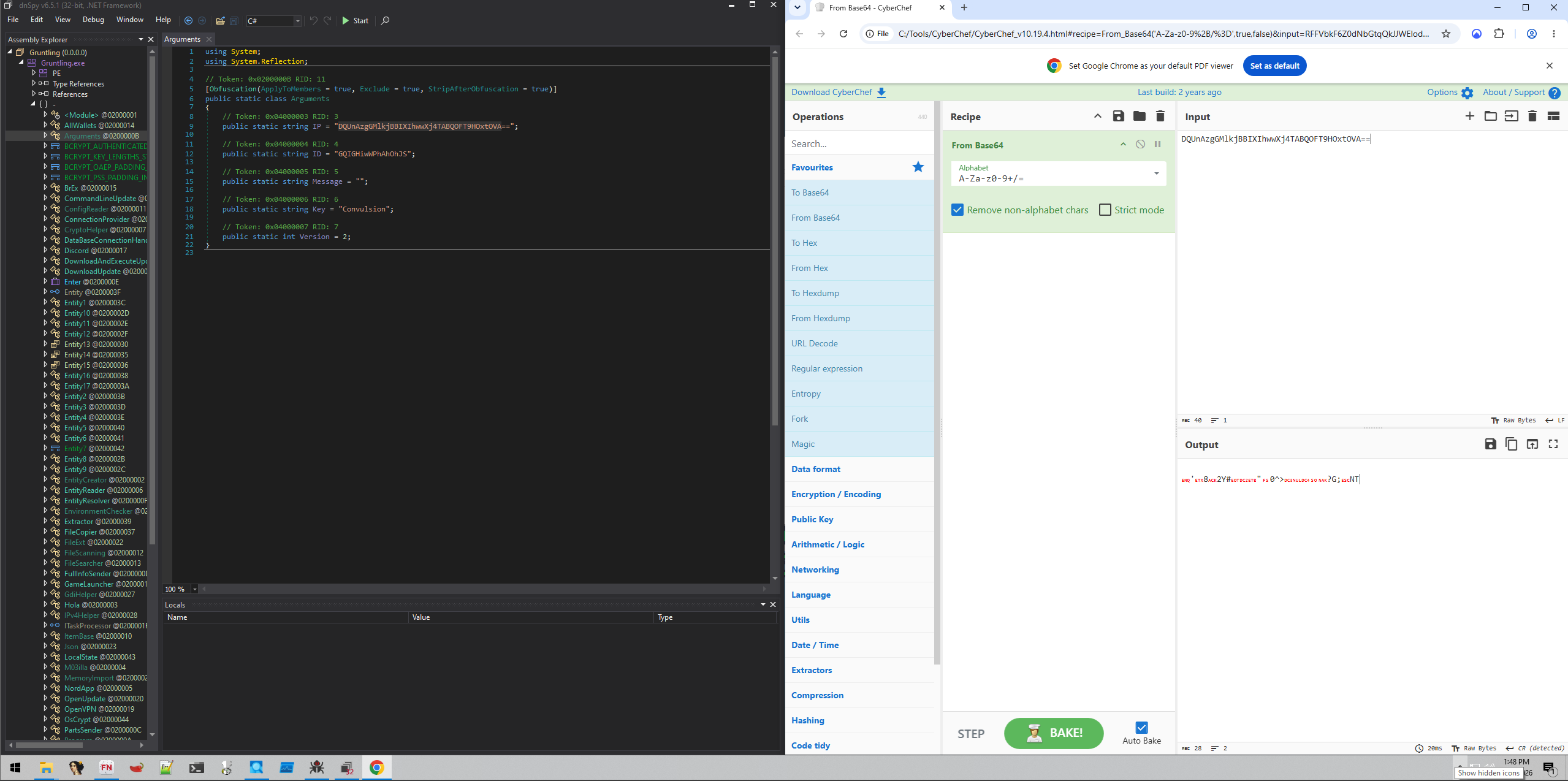
But it didn’t work, so i was thinking, wait we have a key, let’s try something simple like “XOR” for example and add the key:
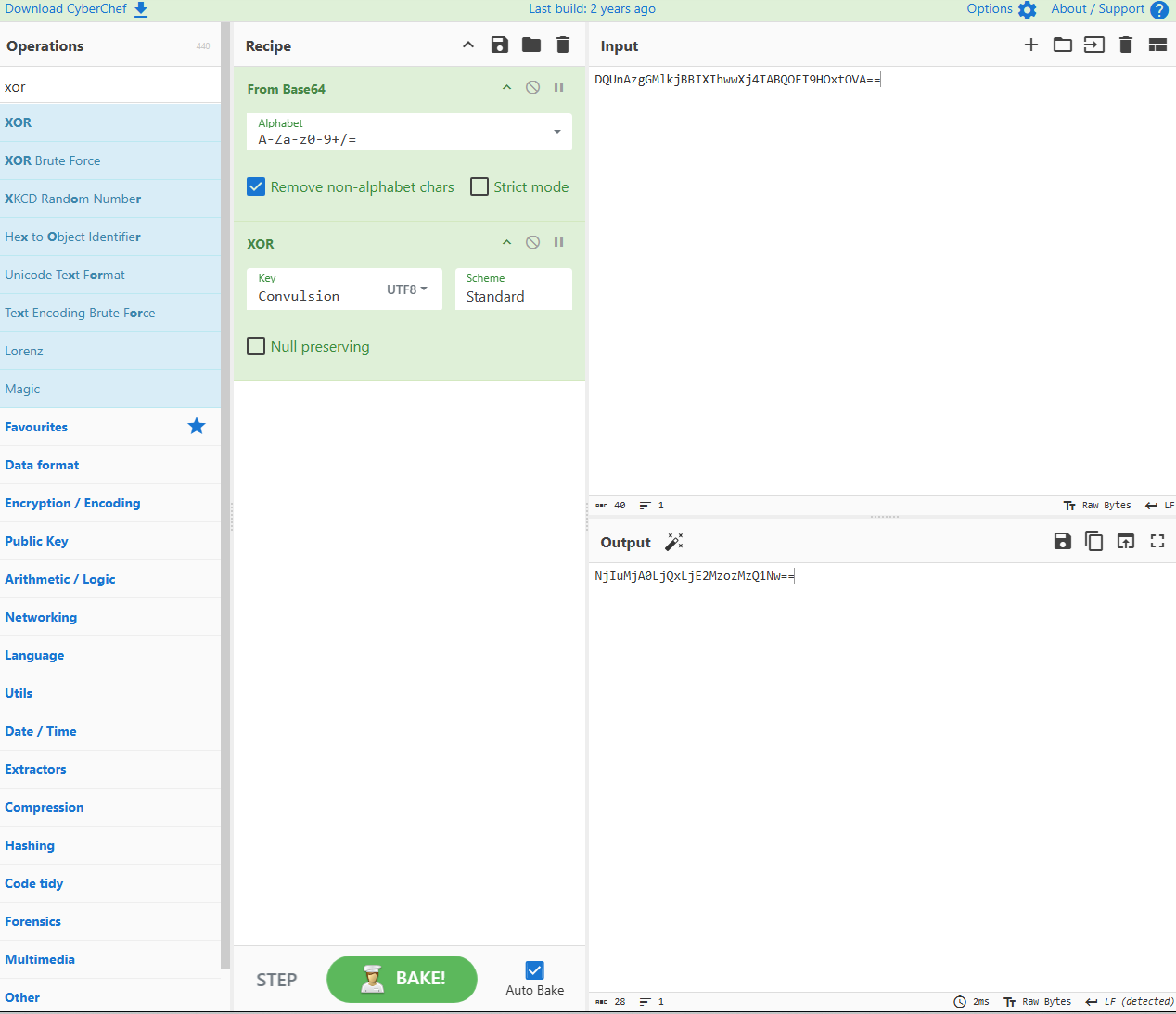
And another base64 appear, so let’s add another base64 in cyberchef:
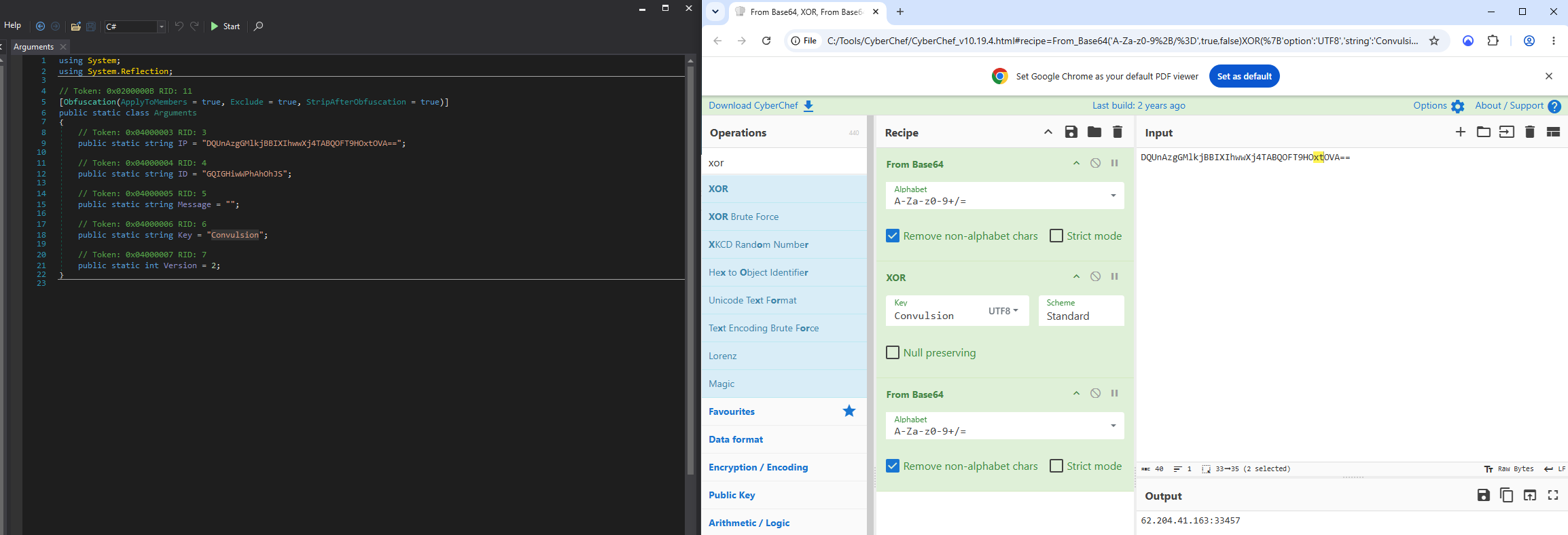
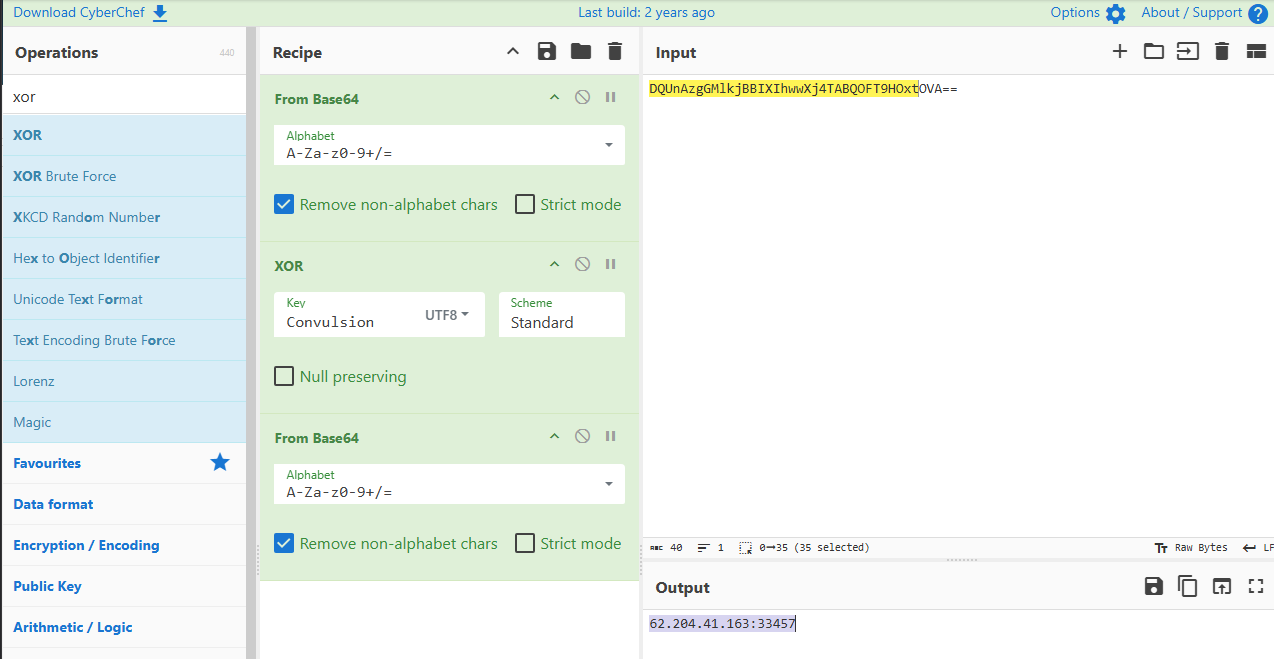
here we go, this is the same IP that the malware tried to connect to during execution and we detect that using “fakenet”.
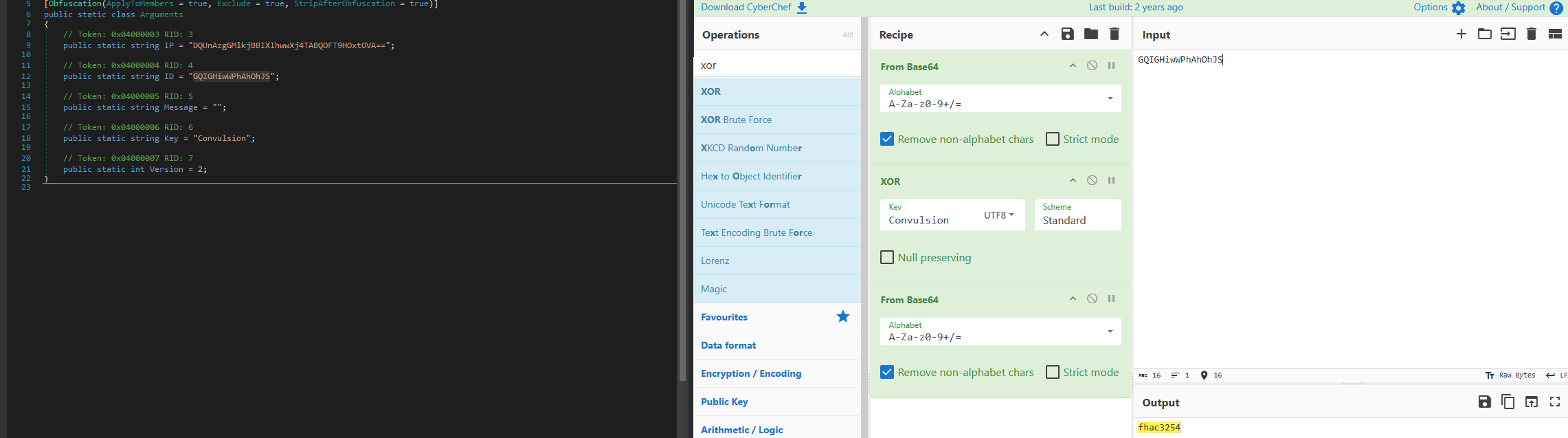
I used the same to the ID to see what it contains and we found “fhac3254” which is appear to be the ID of the malware sample since most of these malware used in MaaS market:
Another interesting function was “BrEx” which contains array with base64 encoded string which is the one we saw before during the first step (contains wallets addresses):
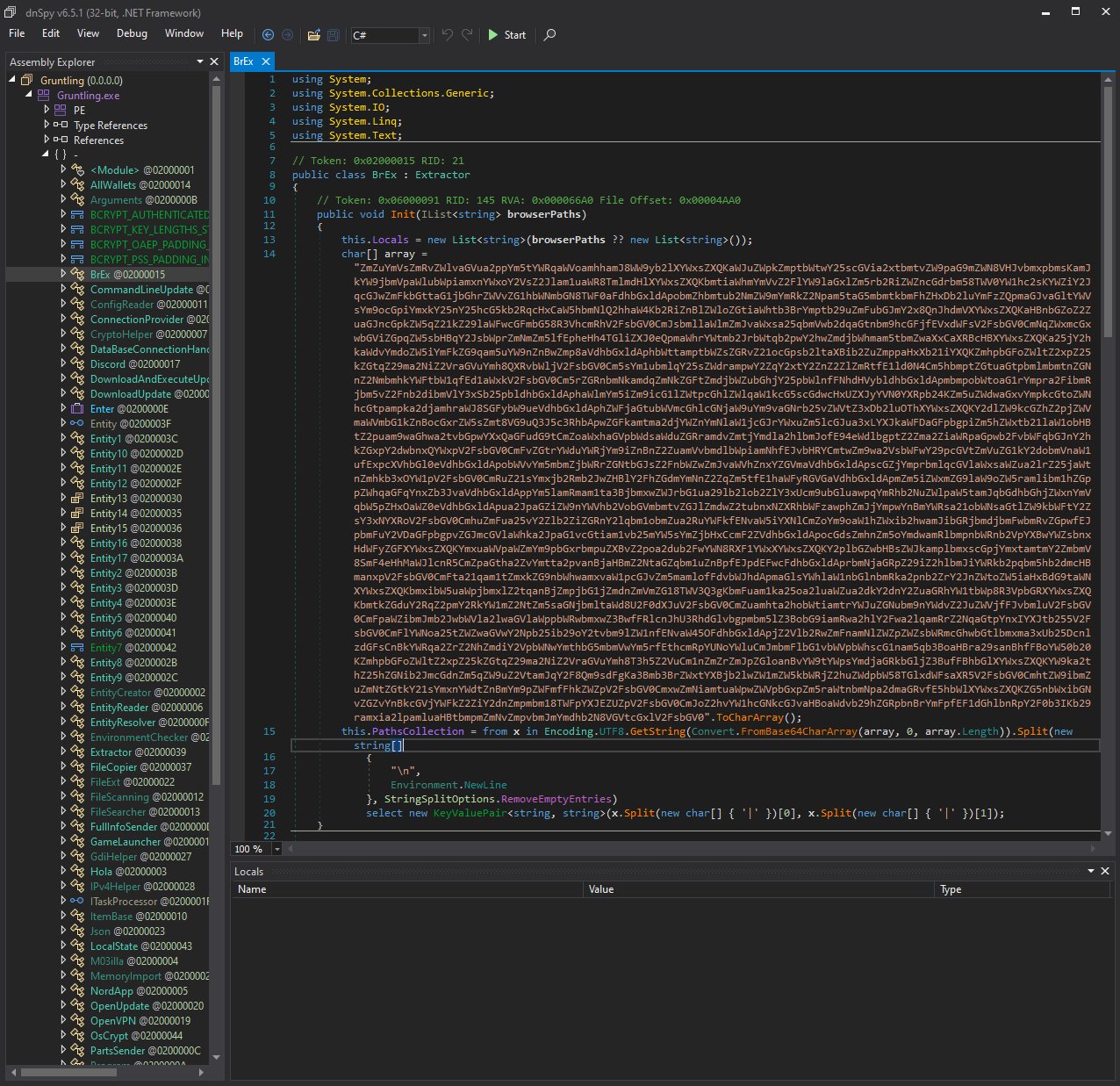
Until this point I will stop the investigation since RedLine is well known infostealer it collect credential, wallets, , etc. and we all know RedLine capabilities, but one thing before we go, let’s check the dumped sample in Virustotal and see the result
I have used the private scan feature (only exist in enterprise version) to ensure that the sample doesn’t shown publicly (in case it’s not submitted before):
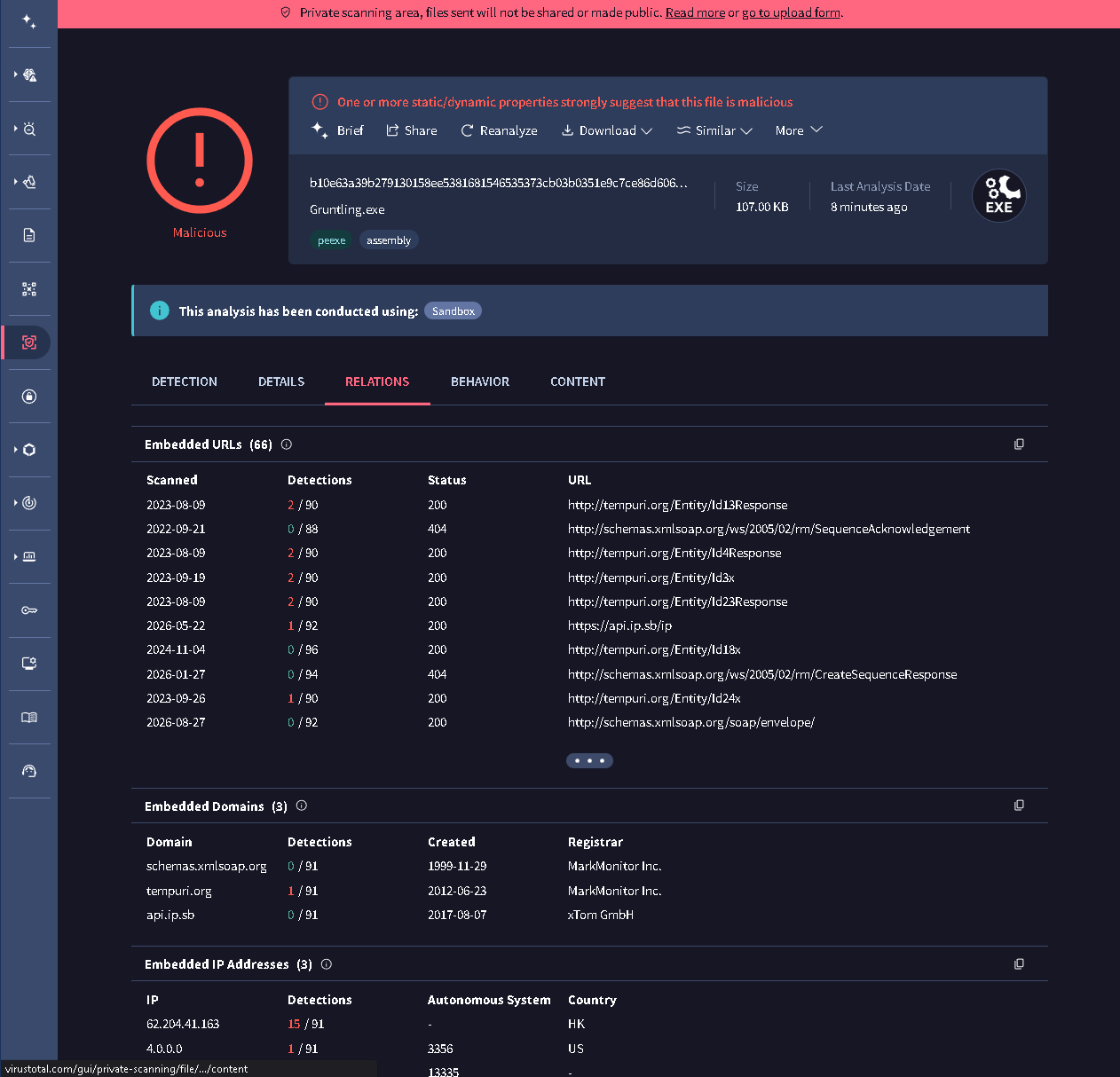
As we can see the file wasn’t submitted before, so it’s and from the detection page it matched with a lot of “RedLine” YARA rules:
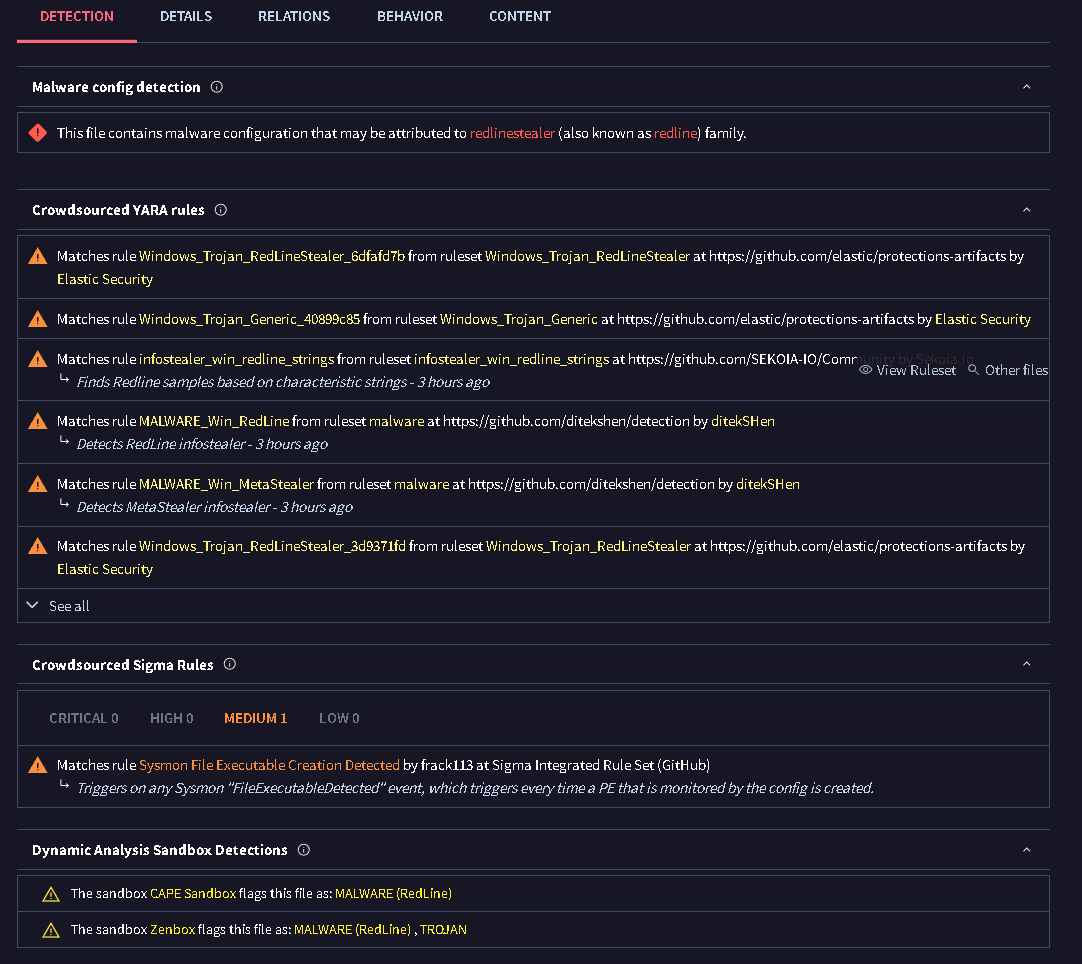
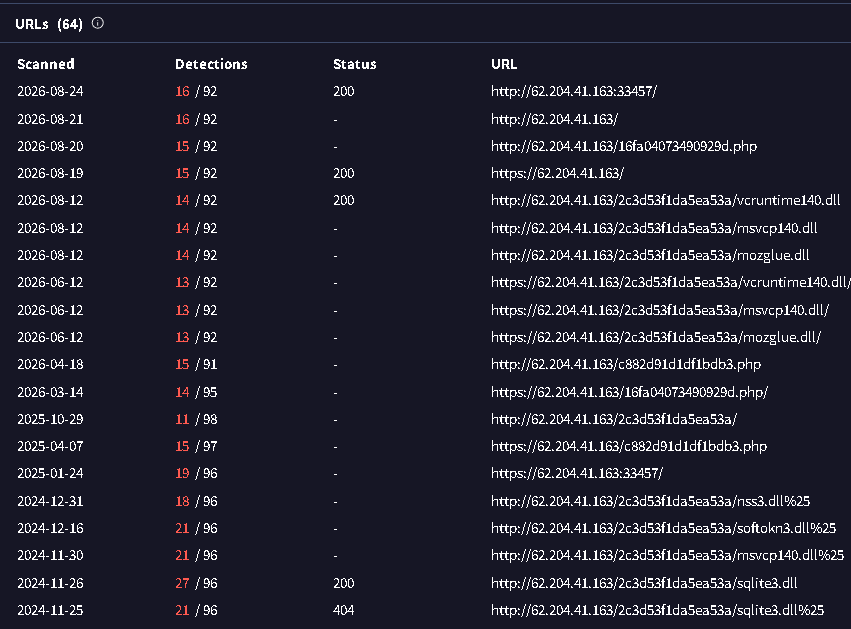
from the network information, we can see the connection that was able to spot which is to the IP (62.204.41[.]163) with 15 detection and port 33457 and country HK categorized as C2.
From the lookup overview breakdown by region, we can identify that this sample speared in US, China, and South Korea in the first place.
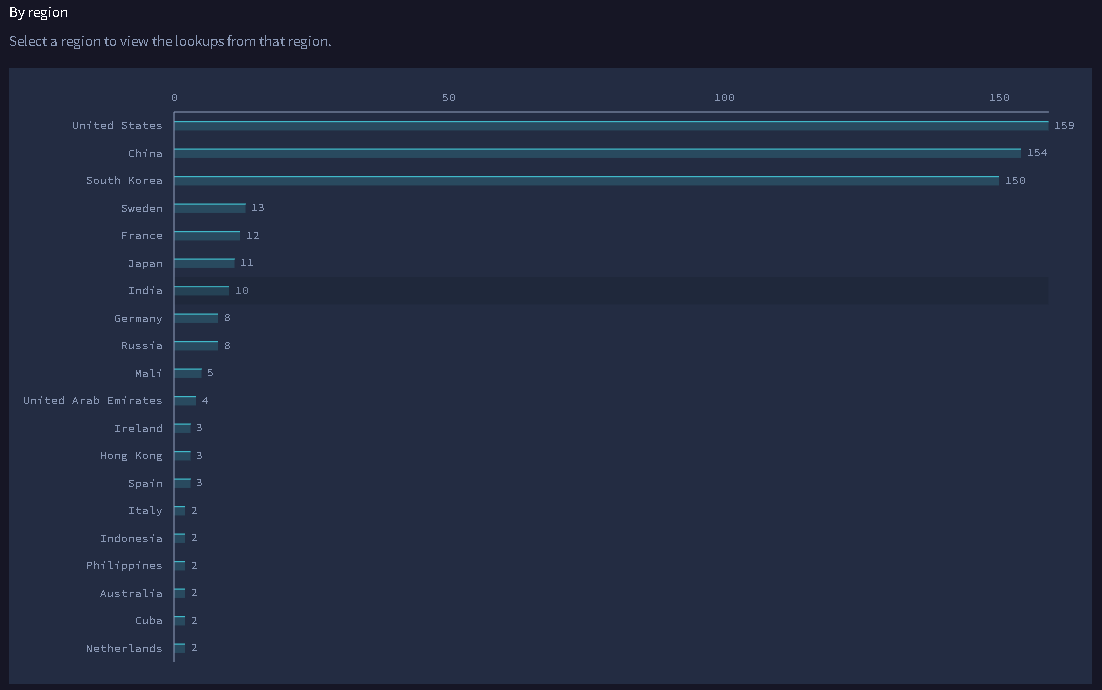
also it connect with 157 other malware samples most of them also a redline, if we want to dig deep we can start check these samples and identify the other indicators that connect them together which will give us the capabilities to uncover more information about the attacker.
In URL section we can identify some of malicious DLL files downloaded from the attacker infra, which I assume it used in “DLL-Sideloading” attacks.
Summary
RedLine infostealer is well known type of malware, but still a lot of their core sample such as the one in our case, avoid the detection by hiding them self in benign software, which make these kind of samples very efficient to reused later on embedded into other benign software’s and the cycle keep moving.
MITRE ATT&CK Mapping
| Tactic | Technique | ID | Evidence |
|---|---|---|---|
| Defense Evasion | Process Hollowing | T1055.012 | AppLaunch.exe suspended creation, remote write, resume |
| Defense Evasion | Obfuscated Files or Information | T1027 | Packed loader, string interleaving, AES-GCM config |
| Defense Evasion | System Binary Proxy Execution | T1218 | Execution under signed Microsoft binary |
| Discovery | System Information Discovery | T1082 | GetWindowsVersion, AvailableLanguages |
| Discovery | System Network Configuration Discovery | T1016 | GetDefaultIPv4Address, api.ip.sb |
| Discovery | Software Discovery | T1518 | ListOfPrograms |
| Discovery | Domain Trust Discovery | T1482 | DomainExists |
| Credential Access | Credentials from Web Browsers | T1555.003 | Login Data, cookies.sqlite |
| Credential Access | Steal Web Session Cookie | T1539 | Cookies, Extension Cookies |
| Collection | Data from Local System | T1005 | Telegram tdata, *wallet* |
| Exfiltration | Exfiltration Over C2 Channel | T1041 | WCF NetTcp transport |
Detection & IOC’s
1
2
3
4
5
6
7
8
9
10
11
12
13
14
15
16
17
18
19
20
21
22
23
24
25
26
27
28
29
30
31
32
33
34
title: AppLaunch.exe Spawned by Non-Microsoft Parent
status: experimental
description: >
  Detects AppLaunch.exe created by a parent that is not a legitimate .NET
  build or deployment process. AppLaunch.exe is a common process hollowing
  target because it is Microsoft-signed and performs minimal work of its own.
references:
author: Mohammad Alattas
date: 28/08/202
tags:
  - attack.defense_evasion
  - attack.t1055.012   # Process Hollowing
  - attack.t1218       # Signed Binary Proxy Execution
logsource:
  category: process_creation
  product: windows
detection:
  selection:
    Image|endswith: '\AppLaunch.exe'
  filter_legit:
    ParentImage|endswith:
      - '\msbuild.exe'
      - '\devenv.exe'
      - '\mscorsvw.exe'
      - '\ngen.exe'
  filter_syspaths:
    ParentImage|startswith:
      - 'C:\Program Files\Microsoft Visual Studio\'
      - 'C:\Windows\Microsoft.NET\'
  condition: selection and not 1 of filter_*
falsepositives:
  - Legitimate .NET application deployment in developer environments
  - Custom build tooling invoking AppLaunch directly
level: high
1
2
3
4
5
6
7
8
9
10
11
12
13
14
15
16
17
18
19
20
21
22
23
24
25
26
27
28
29
30
31
32
33
title: Crypto Wallet Extension Directory Access by Non-Browser Process
status: experimental
description: >
  Detects access to cryptocurrency wallet browser extension storage by a
  process that is not the parent browser, consistent with infostealer
  collection activity.
author: Mohammad Alattas
date: 28/08/2026
tags:
  - attack.collection
  - attack.t1555.003   # Credentials from Web Browsers
logsource:
  category: file_access
  product: windows
detection:
  selection:
    TargetFilename|contains:
      - 'nkbihfbeogaeaoehlefnkodbefgpgknn'   # Metamask
      - 'fhbohimaelbohpjbbldcngcnapndodjp'   # Binance
      - 'hnfanknocfeofbddgcijnmhnfnkdnaad'   # Coinbase
      - 'ibnejdfjmmkpcnlpebklmnkoeoihofec'   # Tronlink
  filter_browsers:
    Image|endswith:
      - '\chrome.exe'
      - '\msedge.exe'
      - '\brave.exe'
      - '\opera.exe'
      - '\firefox.exe'
  condition: selection and not filter_browsers
falsepositives:
  - Browser profile backup and sync utilities
  - Endpoint DLP agents performing content inspection
level: high